Pixelate Video Online: Mosaic Faces, Plates and Text
Type what should be hidden, let the AI follow it through the clip, and choose the pixelate effect at export. This page explains when a mosaic beats a blur, and the one case where it can fail.
100 free credits · No credit card
Pixelation on a number plate, mask on faces
Unretouched results from Guardiavision. Left is the uploaded photo, right is what came back for the prompt shown. The same detection runs on every frame of a video.
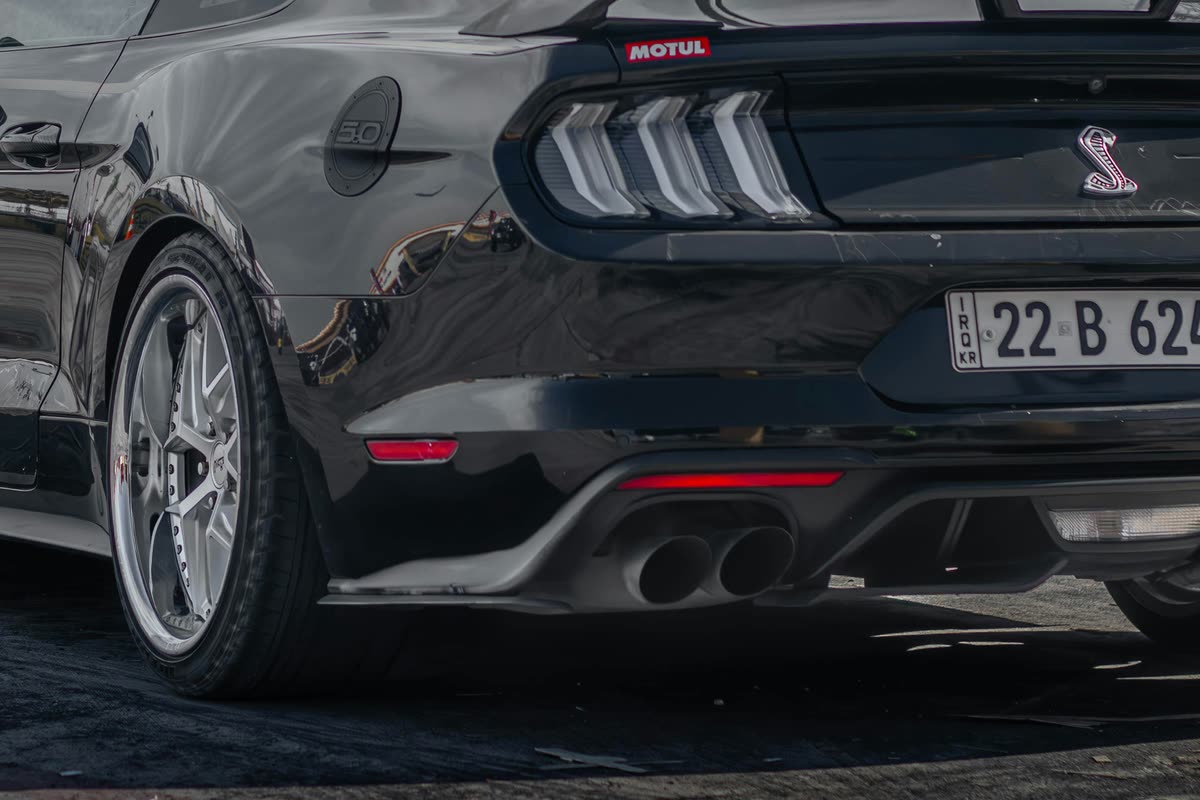 Before
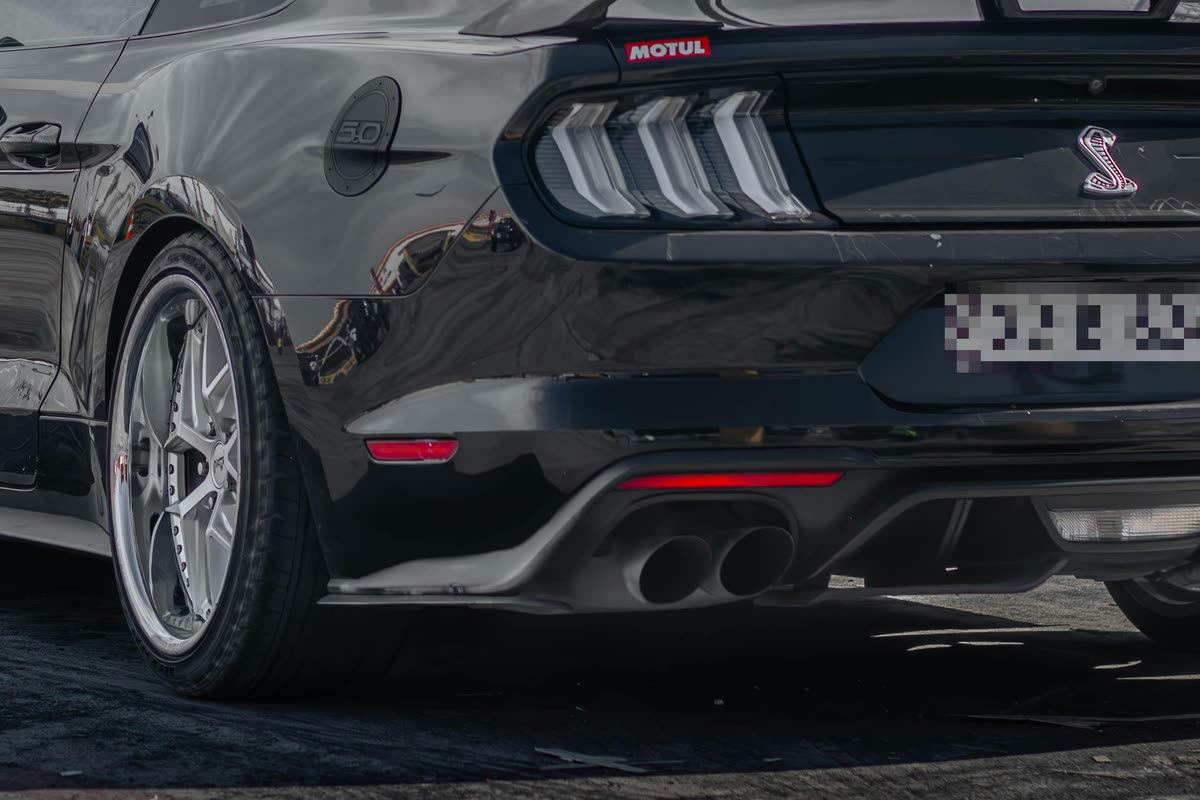 After
license plate. Only the plate is pixelated. The badge, the sticker above the light and the rest of the car are untouched.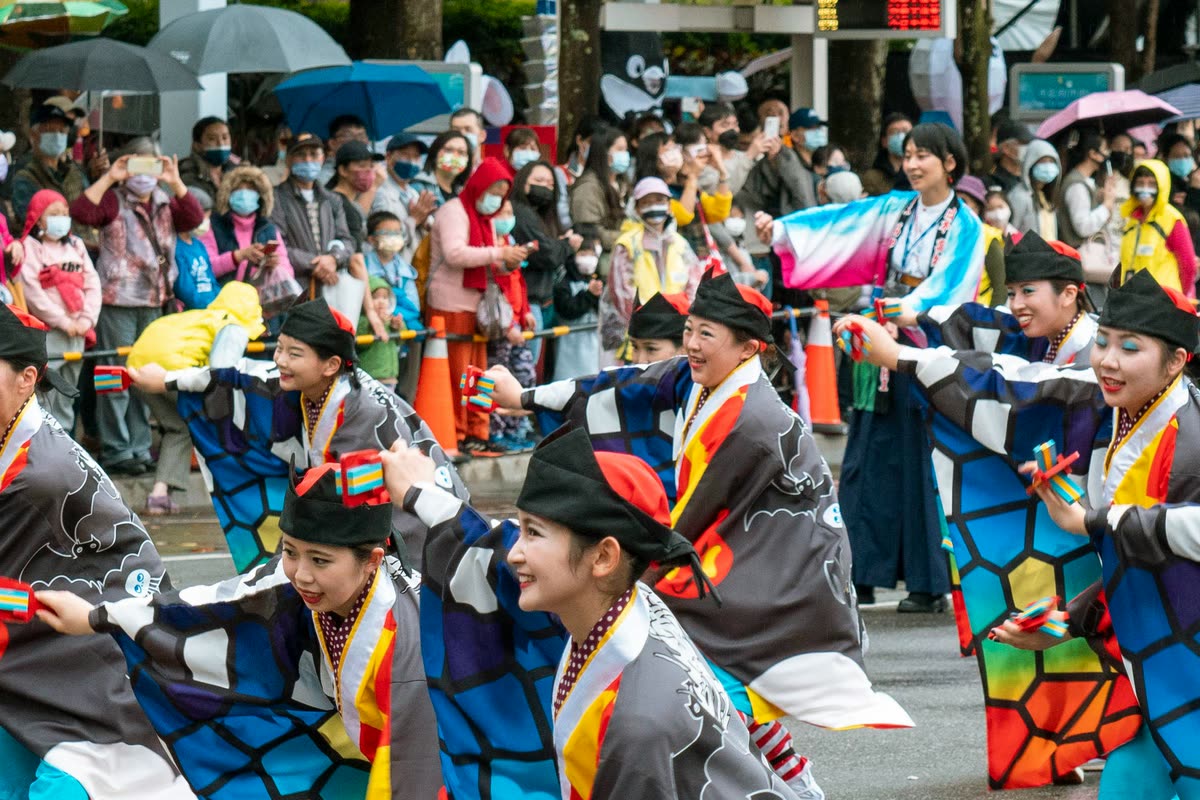 Before
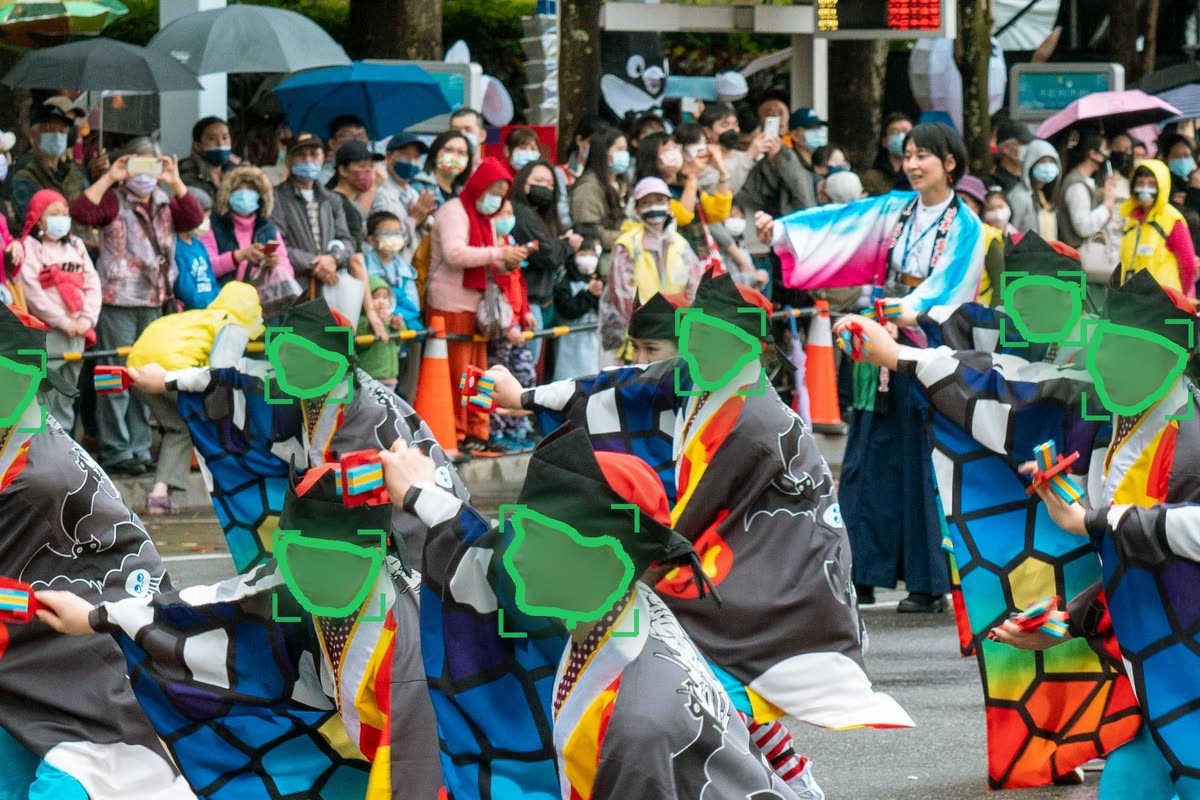 After
faces. Each detected face gets its own mask, shaped to the face rather than a box. Shown here with the solid mask style; blur and pixelation use the same detection.Pixelation versus Gaussian blur: what each one does to the pixels
Pixelation, also called mosaic, divides the target region into a grid of squares and fills each square with a single colour, usually the average of the pixels it covers. A face becomes a patch of flat blocks. The larger the blocks, the less detail survives. Nothing is smoothed; detail is thrown away in chunks.
Gaussian blur does something different. It mixes every pixel with its neighbours, weighted by distance, so edges melt into each other. The region keeps its overall shape and colour gradient but loses sharp features. A blurred face still reads as "a face" even though the person cannot be recognised.
Both are accepted redaction methods, and in Guardiavision both are applied the same way: the AI finds the target, follows it frame by frame, and the effect you pick at export is written into the output video.
When editors and courts prefer a mosaic
The main reason to pixelate rather than blur is that it is unmistakable. That matters in three settings.
Broadcast and news
Television has used mosaic over faces for decades. Viewers read it instantly as "identity protected", not as a focus problem. Editors keep the convention because it needs no explanation.
Evidence and legal review
When a clip is handed to a court, a regulator or an opposing party, reviewers want to see which regions were redacted. Flat blocks make the boundary of the redaction obvious in every frame.
Small text and screens
A light blur can leave large type legible, and a strong blur still hints at line lengths. Mosaic blocks remove the characters entirely, which is what you want on a document, a whiteboard or a phone screen.
Blur wins when the hidden area is large or when the result needs to look polished. A mosaic across the whole background of an interview is distracting; a soft blur looks like shallow depth of field. Bystanders in a property walkthrough or a product demo usually look better blurred because the viewer barely notices the edit. For that kind of job, the blur video online page is the better starting point.
Can pixelation be reversed? The honest answer
Sometimes, if it is done weakly. Researchers have shown that a large face covered with small mosaic blocks can in some cases be reconstructed well enough to recognise the person, because each block still carries an average colour and the grid of averages is a low-resolution picture. The same is true of a light blur. The attack works best when the redacted region is big, the blocks are small, and the attacker has candidate photos to compare against.
The practical consequences are simple. Use a strong setting rather than a subtle one: the less detail that survives inside the redacted region, the less there is to recover. Do not keep the original next to the redacted version in a place where both could leak; the redaction is only as good as the secrecy of the source. And never publish the original frame anywhere, even cropped, because a single clean frame undoes the whole exercise.
Guardiavision applies the effect permanently to the exported MP4. There is no mask layer in the download and no way to toggle it off from the output. Once you have the pixelated file and have deleted the original from your side, the processed output is the only version that exists on the platform, and that is deleted after its 24-hour download window. The original upload is removed as soon as the job completes.
Pixelating faces, plates, text and screens: what changes
Faces
The prompt "face" finds every face in the frame and follows each one through the clip, so the mosaic moves with the person rather than sitting in a fixed spot. Crowd scenes cost the same credits as a single face, because credits are charged per frame, not per detection.
License plates
Plates are small, high-contrast rectangles of text, which makes them easy to detect and easy to destroy with a mosaic. Even a modest block size removes the characters. The AI follows the plate as the vehicle moves, and the output is a tracked mosaic rather than a fixed rectangle.
Text and documents
Prompts such as "document", "whiteboard" or "sign" cover printed and handwritten text. Pixelation is the safer choice here because blur can leave word shapes readable. For text at a fixed position, such as a burned-in timestamp, draw one custom area instead.
Phone and computer screens
Screens change content constantly and devices get picked up and moved, so a tracked detection beats a static box. The prompt "phone screen" or "laptop screen" locks on to the device and the mosaic follows it.
For prompts beyond these four, including logos, tattoos and specific people by clothing, see blur any object in video.
Blur or pixelate: pick one for your clip
The effect is set once per export. Use this table to decide before you export rather than spending credits twice.
| Situation | Pick | Why |
|---|---|---|
| Faces of witnesses, sources, minors | Pixelate | Visibly deliberate; the broadcast and legal convention |
| Number plates and house numbers | Either | Both destroy the characters; pixelate shows reviewers it was done |
| Screens, documents, printed text | Pixelate | Small type can survive a light blur; blocks remove it |
| Bystanders in a product or property video | Blur | Softer, draws less attention in a polished edit |
| Whole background behind a presenter | Blur | Mosaic across a large area looks harsh and distracting |
| Evidence for a court or regulator | Pixelate | Reviewers can see exactly which regions were redacted |
| Anything that must never be recovered | Either, strong setting | The setting matters more than the effect; never publish the original |
Whichever you choose, the credits are the same: about 144 per minute of 720p, 270 per minute of 1080p and 630 per minute of 4K at 30 fps, charged at export. Plans start free with 100 credits; see the pricing page for the paid tiers.
How to pixelate a video online in Guardiavision
Upload the video
MP4, MOV, AVI, MKV, WMV, WebM or HEVC, up to 4K. Files the browser cannot play are converted to MP4 first.
Name what to pixelate
Type "face", "license plate", "phone screen" or any other object. Run several prompts on the same video if needed.
Review the tracking
Scrub the timeline to confirm each target is followed. Toggle detections off, or add a custom area for a fixed caption.
Choose Pixelate at export
Pick the mosaic effect instead of blur. The choice applies to the whole export.
Download the MP4
The pixelation is permanently part of the output file. No watermark on paid plans.
The flow is identical to blurring; the only difference is the effect you select when you export. You sign up with email or Google, no card, and the account starts with 100 credits. Drag the video into the studio. Any container is accepted, and anything the browser cannot play is converted to H.264 MP4 before processing, in the browser on Chrome and Firefox or on the server on Safari.
Type the prompt. "Face" is the most common, but the detector is open-vocabulary, so you can name any object. Run a second prompt for plates or screens if the clip has both. Use the "Blur all" button to cover everything that was found, then scrub the timeline and switch off any detection you want to keep visible, for example the presenter's own face. If there is a fixed element the AI should always cover, draw a custom area over it.
At export, choose Pixelate. The job runs on GPU servers; a short HD clip is usually done within a minute or two, longer and higher-resolution files take proportionally longer. Download the MP4. The mosaic is part of the file, at the original resolution. A longer walkthrough of the prompt flow is in the guide on how to blur anything in a video with AI. If the job is a formal request with a deadline, the redact video online page adds the review and logging steps; if faces are the only target, the blur faces in video page covers crowds and people who turn away, and everything there applies to the mosaic effect too.
Pixelation questions, answered plainly
Can the pixelation be removed from the exported video?
Not from the file you download. The mosaic is burned into the pixels of the exported MP4, so there is no layer to switch off and no original hidden inside. The only way to get the unpixelated footage back is from the original file, which is why you should keep that file private or delete it once the job is done.
Why do news broadcasts use mosaic instead of blur?
Mosaic makes it obvious that something was deliberately hidden, which is what a broadcaster wants when protecting a source or a minor. Blur can be mistaken for soft focus or a camera fault. The block pattern is also an established convention that viewers understand at a glance.
Is a pixelated face still personal data under GDPR?
If the person can no longer be identified from the output, the footage is anonymised and Recital 26 says anonymised data falls outside the GDPR. That holds only if the pixelation is strong enough and the original is not kept alongside it. A weakly pixelated face that could be reconstructed is still identifiable and still personal data.
Can I pixelate a moving car number plate online?
Yes. Type "license plate" as the prompt and the AI detects each plate and follows it as the car moves, turns or passes behind other vehicles. Choose pixelate at export and the mosaic stays locked to the plate in every frame.
Can I pixelate text, a document or a phone screen rather than a person?
Yes. The detection is open-vocabulary, so prompts such as "phone screen", "document", "laptop screen" or "sign" work the same way as "face". For a fixed on-screen caption you can also draw one custom rectangular area that is always covered regardless of what the AI finds.
Does pixelating a video online reduce the quality of the rest of the frame?
No. Only the detected regions are replaced with mosaic blocks. The exported MP4 keeps the original resolution, up to 4K, and everything outside the pixelated areas is encoded normally.
Can I mix pixelation and blur in the same video?
The effect is chosen per export, so one export is either pixelated or blurred throughout. If you want a mosaic on faces and a blur on the background, export twice with different prompts, or pick the single effect that suits the whole clip.
Pixelate your first video online
100 free credits. No credit card. Mosaic burned into the MP4.
Start Free