Redact Video Online for GDPR, FOIA and Court Requests
Redaction is blurring with a deadline and a paper trail. This page covers who has to redact video and under which rule, a workflow with a real review step, a CCTV subject access checklist, and what Guardiavision does not do.
100 free credits · No credit card · Runs in the browser
Redacted screens and faces
Unretouched results from Guardiavision. Left is the uploaded photo, right is what came back for the prompt shown. The same detection runs on every frame of a video.
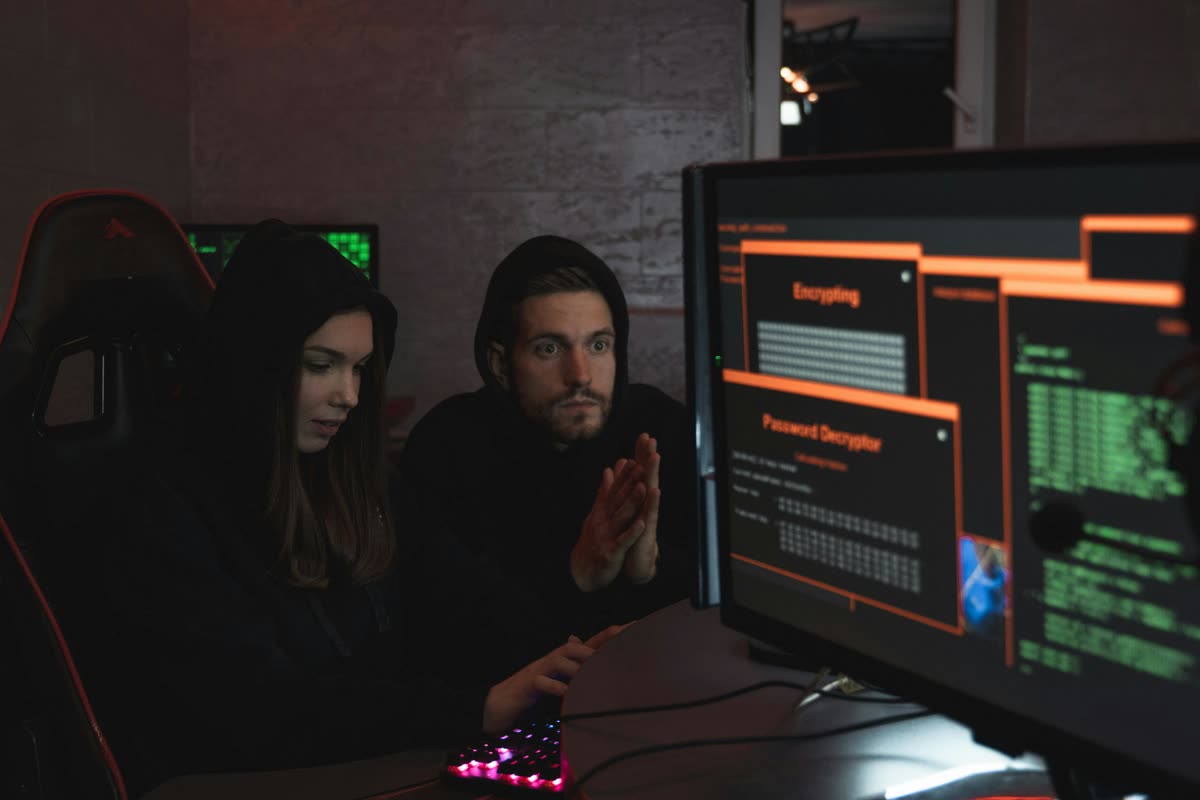 Before
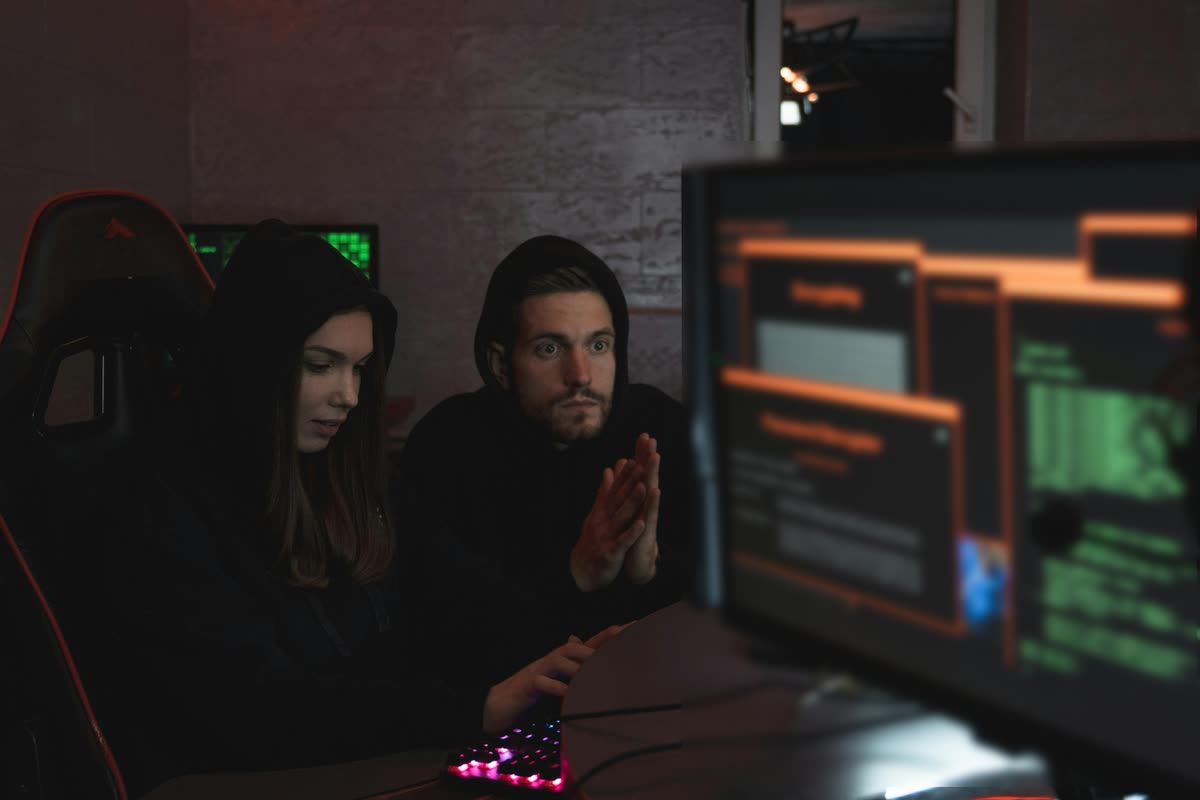 After
computer screens. The screen contents are blurred, the people in front of them are not. Swap the prompt to "faces" and it is the other way round.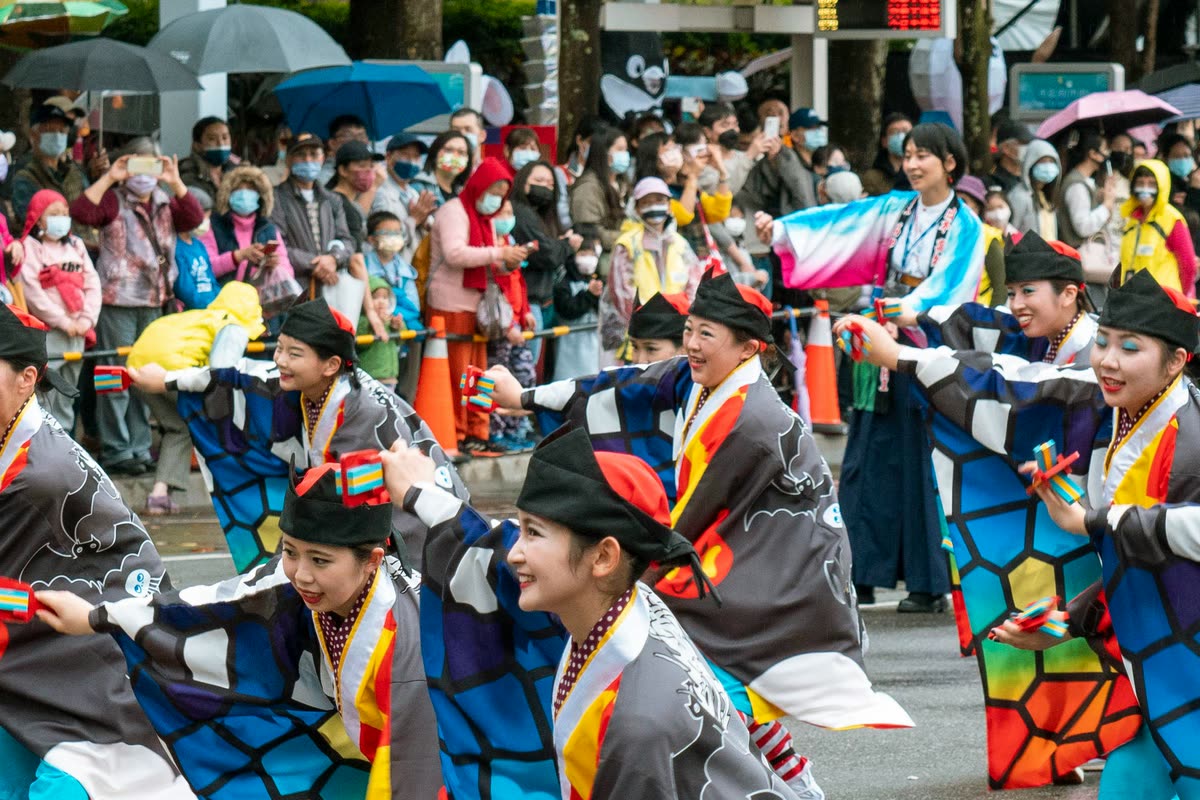 Before
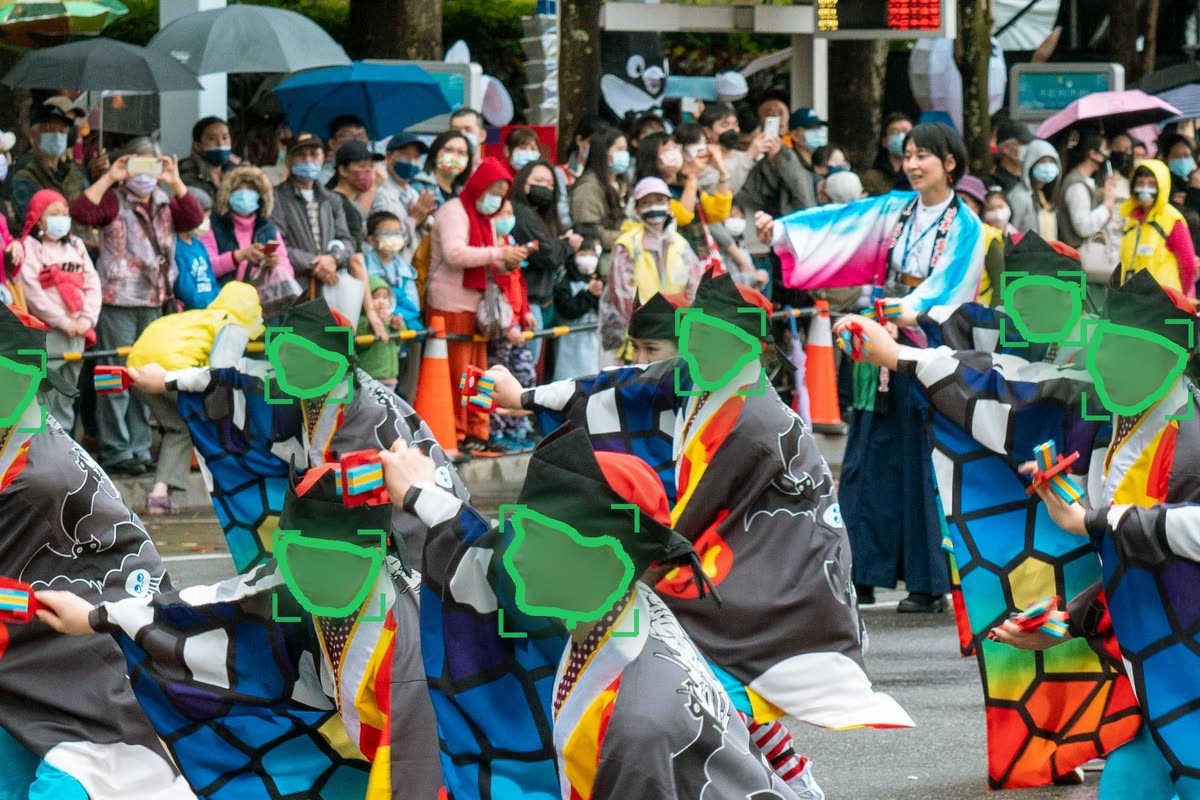 After
faces. Each detected face gets its own mask, shaped to the face rather than a box. Shown here with the solid mask style; blur and pixelation use the same detection.What makes it redaction rather than just blurring
Redaction is blurring carried out to a standard that someone else may later inspect. Three things separate it from casual blurring.
It is permanent. An editing project with a blur layer on top is not redacted; the layer can be removed. Guardiavision writes the blur or mosaic into the pixels of the exported MP4, and there is no original hidden inside the output.
It is complete. A person who is covered for ninety seconds and visible for three is not redacted. That is why the workflow below insists on scrubbing the entire timeline before export, and why the AI follows each detection through the clip instead of blurring a fixed spot.
It is accountable. You should be able to say what was removed, why, by whom and when. The studio shows you which detections are on or off before you export; the written log is yours to keep.
Who has to redact video, and under which rule
A recognisable face, or a number plate that can be linked to a person, is personal data under GDPR Art. 4(1). From there, several routine situations become redaction jobs.
CCTV subject access requests (GDPR Art. 15)
A shop, landlord, employer or council that runs cameras must give a person a copy of footage showing them when asked. The deadline is one month, extendable by two months for complex requests. Other people in the frame are third parties and must be masked before the copy goes out.
FOIA and public-records requests (US)
Bodycam and dashcam footage held by police departments, city agencies and schools is subject to state public-records laws and federal FOIA. Faces of bystanders, minors and victims are redacted before release. There is no federal privacy statute; state laws such as CCPA/CPRA and Illinois BIPA add their own duties.
Court evidence
Video exhibits are shared with opposing parties and sometimes shown in open court. Witnesses, juveniles and unrelated members of the public are routinely redacted, and the redaction needs to be consistent across every frame.
HR investigations and insurance claims
Workplace footage used in a disciplinary case, or a dashcam clip sent to an insurer, usually shows colleagues or passers-by who are not part of the matter. Redacting them limits the disclosure to what the purpose requires.
GDPR Art. 83 allows fines of up to €20 million or 4% of worldwide annual turnover. Recital 26 is the upside: footage in which nobody can be identified is anonymised and outside the regulation, which is the point of redacting properly. For the broader legal picture, see the GDPR guide for images and videos.
A video redaction workflow with a review step
Upload the footage
Any container, including the AVI and MKV exports common from CCTV and bodycam systems. Files are converted to MP4 if the browser cannot play them.
Prompt for every category
Run "face", then "license plate", then anything else the request covers, such as "phone screen" or "document".
Review every frame
Scrub the full timeline. Switch off detections that should stay visible and confirm nothing was missed.
Cover fixed elements
Draw a custom area over timestamps, camera labels or captions if the request requires them removed.
Export, then log it
Choose blur or pixelate, export the MP4, download it, and record what was redacted and when in your own log.
Prompt by category, not by guess. Start with "face", then "license plate" if vehicles appear, then whatever the request implies: "phone screen" in an office, "document" on a desk. Each prompt produces its own detections, and you can run as many as the footage needs.
Review the whole timeline. This is the step casual blurring skips. Scrub from first frame to last, watching people enter and leave the frame or pass behind obstacles. Toggle off any detection that should remain visible, such as the requester in a subject access request, and use "Blur all" only once you know what it will cover.
Choose the effect and export. Blur and pixelate are both accepted. Pixelation makes the redaction obvious to a reviewer, which a reviewer can see at a glance; the pixelate video online page explains the trade-off. Whichever you choose, use a strong setting. Credits are charged at export only and refunded if the job fails.
Delete and log. Download the MP4. The original upload has already been removed from the platform when the job completed, and the output disappears after 24 hours. On your side, move the original out of the working folder to wherever your retention policy keeps masters, and write down the date, the prompts used, which detections were toggled off, who did the review and who received the copy.
Redaction checklist for a CCTV subject access request
The commonest redaction job for a small business, school or council is one person asking for CCTV footage of themselves. This sequence gets it done inside the one-month window.
| Step | When | Note |
|---|---|---|
| Confirm the requester's identity | On receipt | Before releasing any footage |
| Note the receipt date and the one-month deadline | On receipt | Extendable by two months if complex; tell the requester |
| Locate the clip and trim to the relevant period | Day 1 to 5 | Shorter clips cost fewer credits and are quicker to review |
| Redact all third-party faces | Processing | Prompt "face", then toggle off the requester |
| Redact third-party number plates | Processing | Prompt "license plate" |
| Cover fixed identifiers if required | Processing | Custom area over timestamps or location labels |
| Review the full timeline frame by frame | Before export | Check entries, exits and partial occlusions |
| Export with a strong blur or pixelate setting | Export | Permanent; cannot be undone from the output |
| Download, then delete the original from your working folder | After export | Keep the master only where retention requires |
| Record what was redacted, by whom, and when | After export | Your own log; Guardiavision does not export one |
More on CCTV footage specifically is on the CCTV face blur page. For police and public-body footage, see bodycam redaction.
Desktop editors and enterprise redaction suites: when they are too much
Desktop editors. DaVinci Resolve is free and Adobe Premiere Pro is a subscription, and both can produce a legally sound redacted file. The cost is operator time: one mask per person, a tracker to start and babysit, and a re-check every time somebody leaves and re-enters the frame, by someone who knows the software.
Enterprise redaction platforms. brighter AI, Celantur and Pimloc Secure Redact are built for large organisations that redact footage every day. Pricing is by quote and onboarding is a project. If you are a retailer handling three subject access requests a year, a council with the occasional records request, or an HR department with one investigation, that is more process than the job needs.
Guardiavision. A browser, a prompt, a timeline and an export. Plans start free with 100 credits, and Standard is €10 per month for 700 credits with files up to 250 MB. The trade-off is scope: it is a tool for people who redact sometimes, not a platform for people who redact all day. The comparison with brighter AI is in brighter AI versus Guardiavision, and plan details are on the pricing page.
What Guardiavision does not do for redaction
No audit log export. The studio shows you which detections are on and off while you work, but there is no downloadable report listing the redactions. Keep your own record in the case file; the checklist above tells you what to write down.
No on-premise install. Processing happens on Guardiavision servers. Uploads are encrypted in transit, deleted when the job completes and never used to train models, but if your policy requires that footage never leaves your network, this is not the right tool.
Organisations that need volume or contractual terms can write to support@guardiavision.com or read the enterprise page. For removing identity from footage altogether, see video anonymization.
Video redaction questions from compliance teams
What is the deadline for answering a CCTV subject access request?
Under GDPR Art. 15 you must respond within one month of receiving the request. That can be extended by a further two months if the request is complex or you have received several, but you must tell the requester about the extension within the first month. UK GDPR and the Data Protection Act 2018 apply the same timeline.
Do I have to redact other people before releasing CCTV to the person who asked?
Yes, as a rule. The requester is entitled to their own personal data, not to other people's. Anyone else who is identifiable in the footage, by face, number plate or other detail, should be masked before the copy is handed over unless they have consented or another exemption applies.
Is a blurred or pixelated video accepted as redacted evidence?
Both blur and pixelation are accepted redaction methods, provided the setting is strong enough that the person or plate cannot be recovered. Courts and regulators care that the redaction is permanent, applied to every frame, and that you can describe what was removed and why. Keep your own note of the prompts used and the review carried out.
Can I redact only one person and leave everyone else visible?
Yes. Run the prompt, then toggle off the detections you want to keep, for example the requester themselves or your own staff who have consented. Only the detections left switched on are redacted at export. You can also describe a specific person, such as "person in red jacket", to target them directly.
Does video redaction online count as sharing the footage with a third party?
Uploading to any processor involves a transfer, so record Guardiavision as a processor in your own documentation. Transfers are encrypted with TLS, originals are deleted when the job completes, outputs are deleted after 24 hours, and uploads are never used to train AI models. If your policy forbids any cloud processing, you need an on-premise tool instead.
How do I redact a timestamp or camera label that is burned into the footage?
Fixed on-screen elements do not need detection. Draw one custom rectangular area over the timestamp or label in the studio and it is covered in every frame of the export. There is one custom area per video, so if several fixed elements need covering, draw the area to include them all or redact them in a second pass.
How many credits does a ten-minute CCTV clip take to redact?
Most CCTV exports are 720p, which costs about 144 credits per minute at 30 fps, so ten minutes is roughly 1,440 credits. That is well beyond the 100 free credits, so a request of that size needs the Standard plan (700 credits a month) with a top-up pack, or the Pro plan at 3,500 credits per month. Trimming the clip to the period the requester actually appears in is the simplest way to bring the cost down.
Redact the footage before the deadline
100 free credits to test the workflow on a short clip. No credit card. Permanent redaction.
Start Redacting Free